




Recommended Videos
To celebrate the 70th birthday of Bob Moog, inventor of the Moog synthesizer, Google has put a fully functional version of the Minimoog model D along with a four-track recorder as a Doodle. This is definitely one of the more complex Doodles we’ve seen, but here’s some advice to get you started.
Some key points before playing your fake Moog synth:
- First, click on the keyboard so you can play the virtual keyboard with your physical keyboard. The lowest key is the Tab button and the highest is “”
- The black keys correspond to the number keys and are in the same position relative to the letter keys as they are on the keyboard — so “4” does nothing, for instance.
- Click one of the four “tracks” on the recorder to activate that particular track. Playback will play all simultaneously.
- The red light in the final “G” in Google indicates whether the Moog is active. If it’s not lit, then typing will just trigger a Google search.
- The left/right arrow keys select different knobs, and they can be adjusted with the up/down keys. Clicking also works.
- Your final recordings can be shared over Google+ (surprise, surprise) or via a direct link.
- Some examples and advice on how to play the Google doodle are available in this Reddit thread.
For more on how to actually use all those fiddly knobs, the following quick start guide from Moog should prove quite useful.
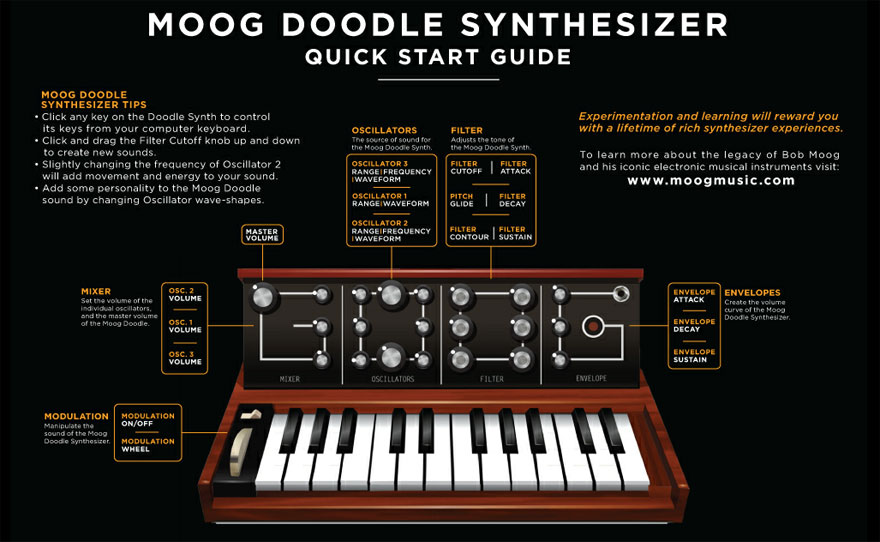
Still confused? Maybe Cyril Lance, Moog’s chief engineer can help.
If any of you manage to produce any good covers, be sure to link us in the comments. Bonus points for anything off of Yankee Hotel Foxtrot.
(via Moog)
- Here’s how to zerg rush with Google
- Now you can buy Google Doodles
- This Google Doodle was a Les Paul guitar
- Jules Verne got an undersea doodle for his birthday
The Mary Sue is supported by our audience. When you purchase through links on our site, we may earn a small affiliate commission. Learn more