


comScore
Uncategorized Wednesday, August 31st 2011 at 9:58 am

Windows 8 Explorer Design is Bizarre

Microsoft released screenshots of the new redesign of the Explorer in the upcoming Windows 8, and the design seems a little odd, to say the least. The file display panes are fine and are pretty much the norm for Windows for a few iterations now, but the Ribbon — what Microsoft calls the toolbar and menus at the top — is reminiscent of a cluttered browser toolbar that installs itself without one’s permission. At a glance, one may quickly jump to the conclusion that the screenshots circulating around the web are some pranksters satirical take on the Windows Explorer, but these screenshots have come from Microsoft itself, along with a lengthy post explaining exactly why the toolbar and menus look like they do.

Normally, if you have to heavily explain a design choice, whether it be aesthetics or naming conventions, not only did you not quite achieve the whole point of an efficient design in the first place, but the very fact that you had to overly explain your decisions probably means you know it. It seems that is what is happening over on the Microsoft blog post on which the screenshots released.
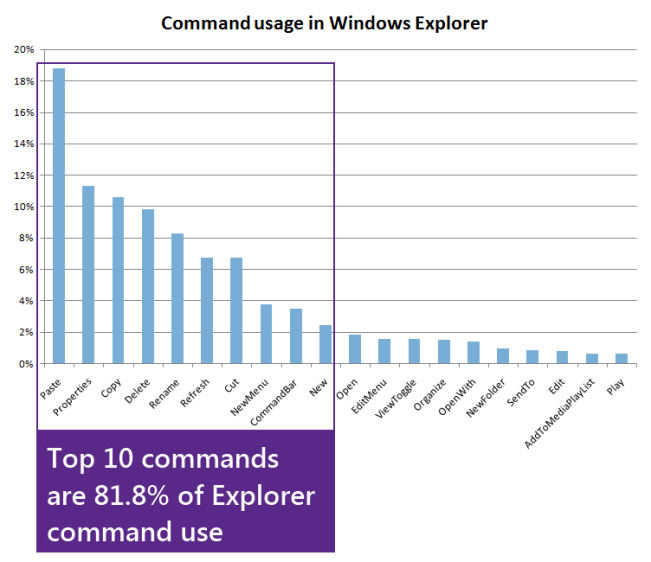
Using telemetry data, Microsoft boiled down the top commands users were using in the Explorer, and then, basically, threw them all over the Ribbon.
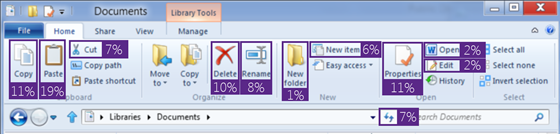
The above mishmosh is just one tab in the Ribbon, as one can see there are various tabs which have their own set of buttons.
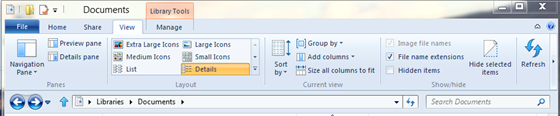
As one can also see, the Up button, a feature that allows users to navigate “up” one level in the folder hierarchy is back, and according to the blog post, “far and away the most requested improvement to Explorer.”

The blog post is filled with a bunch of stats, and it seems Microsoft did their homework regarding the new interface design, however, the homework done doesn’t seem hold accessibility and cleanliness in any regard, and as shown by the new Ribbon design, eschews simplicity and accessibility for “Hey, people use these functions, let’s put them everywhere.” Judging by the amount of explanation provided alongside the screenshots’ release, it seems Microsoft isn’t too sure of their design either.

(via MSDN Blogs)

Filed Under |
  • Aaron M.

     these layouts only work great with touchscreens but on a keyboard/mouse environment, it’s best to keep things simple like they did on windows 7

  • Mike Pants

    This looks a lot like the toolbar redesign they did for Office, which I’ve always found impossible to navigate quickly. It’s fine for copy/paste/save, but the moment you need a strikethough or superscript, you find yourself poking through 3 dozen tiny pictures trying to track it down.

  • Travis Wright

    That’s not how you spell Windows XP

  • Talesin BatBat

    Seconded. This is trying to force the crappy, screen real-estate eating Office Ribbon into the OS, so people will have to deal with it everywhere and get acclimatized, instead of telling them how GODDAMN STUPID it is. You don’t need HUGE icons for everything. Most users learn about CTRL+C/X/V within a week.

    At the very least, I hope there’s a way to natively go back from MORON MODE, unlike in Office.
    Though I *am* happy about the ‘up one directory’ function returning. Its lack is easily the most annoying bit about Explorer in W7.

  • Exibar

    to get your “UP” button back in Windows 7, load a freeware program called “Classic shell”.  It’ll let you even bring back the nice XP start menu too!  I love it and it was the first thing I installed after installing windows 7 :-)

  • Waitstate

    onec again ms is going the WRONG WAY with the gui
    CLEAN SIMPLE these are 2 words ms don’t seem to know.

  • Sdhsdfggf

    Who cares, just use Directory Opus.
    Far, far better design and dual pane file explorer too.

  • Tom Philo

    Like all the Ribbon UI “improvements” it assumes you are ONLY using Exploer – no other APP – it is full screen and you have everything in a SINGLE folder.
    It is lik e “Plan 9 from Outer Space” sounds real good on paper but wait till you see the movie!

  • IT Tech 1194

    Looks like Office 2010 and it still sucks!! make it harder on the end user…GEESH!!!

  • A Santolla

    Get rid of the ribbon. I am still using Office 2003 because of the stupid ribbon. I won’t change until they do and DROP the stupid ribbon design! It doesn’t fit with the screens these days. It takes up TOO MUCH screen space!!